300x250 AD TOP

Showing posts with label Google. Show all posts

Thursday, 20 September 2012

Tagged under:

Gmail in personal search results

Gmail in personal search results

Get early access to Gmail in personal search results by joining this field trial. Once you've joined, you'll be able to find relevant email and information from Gmail when you search on Google.

Email relevant to your search

Find relevant Gmail messages and shared links in your search results.


Contacts and their recent email

Search for contacts you've emailed with recently and see their messages.


Enhanced flight tracking feature


Get updated information and statuses for your flights.

A few things about this field trial
This trial is only accessible on https://www.google.com in English and for @gmail.com addresses (not available on Google Apps accounts). Due to limited capacity and initial setup, you will receive an email confirmation from Google when your account is ready, but note that we may not be able to activate the experiment for everyone.

You can come to this page at any point to leave the trial.

Saturday, 17 March 2012

Tagged under:

Google Play


Introducing Google Play
Now your favorite music, books, movies, apps, and games are all in one place that's accessible from the Web and any Android device. Discover, buy and share like never before.

Play Anywhere
All your entertainment in one place
Google Play is your one-stop shop for all your favorite entertainment. With over 450,000 apps, millions of songs and books, and thousands of movies, Google Play has something for everyone. Before you decide what you want, sample a song or book for free, view app ratings, reviews, and screenshots, or watch a movie trailer. Google Play is a more connected, powerful experience.

The power of the cloud 

How cool would it be if your entertainment was just available anywhere? Now it is. Buy a book on your Android phone and read it on the web at play.google.com. Buy a new album on your Android tablet and listen to it on your desktop at work. Rent a movie online and watch it anywhere on your phone. That’s the beauty of the cloud. You can read, listen and watch all your favorite content anywhere you want. No software required and no wires or syncing needed, and the best part - Google Play cloud is free to use.


Share what you love
Discover, shop, enjoy, and share music, movies, books, and apps anytime, anywhere. When you discover an amazing song, a nail-biting thriller or memorable movie, the first thing you want to do is share it with your friends. On Google Play sharing your favorite entertainment just got easier. You can easily share posts about your favorite books, music, movies, games or apps to your circles on Google+, email, or text message in a single click.

Play with music
Find music you love
Google Play has hand-picked rising artists and great bands from your favorite genres. With music on Google Play, you’ll get personalized recommendations based on what you listen to most. And when you're not shopping for new music, rediscover your library by creating an Instant Mix.
Buy now, listen now, sync never

There are hundreds of free songs and millions more to buy on Google Play. The music you choose is automatically stored in your Google Play music library and instantly ready to play on your computer, Android phone or tablet.

Your music, anytime, anywhere
Access your Google Play music library anywhere, anytime - no syncing, no wires. Stream music instantly on the Web and listen on your Android phone or tablet with the Google Play Music app. Not online? No problem. Just pin your favorites to your mobile device for offline playback.
Organize your music
Keep all your music in one place. Anything you get on Google Play is automatically stored in your music library and you can even add up to 20,000 of your own songs for free. With your music saved online, you can stop worrying about storage space and start enjoying your collection anywhere.
Give your friends a free listen
Sharing is caring. When you buy music on Google Play, you can share a free listen with your friends on Google+. And you get a free listen when they share what they've bought with you. It's sharing, discovering and buying music made simple.
Play with books
Find new books
Discovering your favorite books and authors has never been easier. With Google Play, shop the world's largest selection of eBooks - from thrillers to comedy, cookbooks, bestselling fiction, and everything in between - find over 4 million books to choose from, including millions of free titles. With Google Play, your next great read is always at your fingertips.
Buy anytime, anywhere
Shop on the web or on your device, find the eBooks you love, and start reading instantly. Choose from millions of titles, browse new releases, sample books for free, and find the latest up-and-coming authors.
Share what you love
Sharing the books you love with family and friends is just a click away. With Google Play you can easily post your favorite reads to your circles on Google+, via email, or text message, right from the pages of your book, without skipping a beat.
Your books in the cloud
With Google Play enjoy seamless syncing and easy access across your devices. All your books are stored in the cloud, so your entire library is always with you, accessible from any connected device. And with offline reading, it’s never been simpler to dive into your favorite books when you are offline, out of range, or in the air. Start reading on your tablet, continue on the web, and finish that chapter on your phone. You’ll pick up the story just where you left off, always on the right page.
Customize your reading experience
Read your books any way you like them on Google Play. Easily switch between day or nighttime mode, view in landscape or portrait, choose your font, text size, line height, and customize to your heart’s content.
Play with apps and games
There is an app for everyone
Race to the finish line. Score a goal. Buy stocks. Read the news. Buy movie tickets. Update your status. Personalize your phone with live wallpapers, ringtones, and widgets. With over 450,000 Android apps and games your phone truly is your mobile entertainment system, organizer and portable computer all wrapped in one.

Find new apps and games

Looking for new apps? Check out our staff picks, hand-picked by our editorial team, browse apps by category or just search for them. You can also read reviews and ratings from other app and games users, and even add your own.
Get the latest updates
App developers are always updating their amazing apps with new features, tools and fixes. Google Play makes keeping your favorite apps up to date easy. Select ‘update automatically’ in your app settings and your app will always be updated. Or choose to update all your apps in one click. It’s that simple.

Get your favorite app, anywhere
Just found a new app on the web and can’t wait to try it? Install it from Google Play on the Web without ever touching your device. The app you install is now available on the device you choose - instantly.

Play with movies
Find the movies you love
Choose from an incredible selection of thousands of movies on Google Play including HD titles, new releases, award-winning films or your favorite classics. Whether you’re in the mood for comedy, drama, animation, action or a documentary, there’s a movie that’s right for you.

Watch it now or later
Rent movies and watch them instantly. Alternatively, download your movie for offline viewing and view it later using the Google Play Movies app or watch it directly on the Web.
Watch it anywhere
Watch Google Play movies anywhere -- your couch, your friends’ house or in-flight. When you rent a movie with Google Play you can watch it on your phone, tablet or any Web connected PC. 


When will I get Google Play?
It's coming. Learn more in our help center article here.


Goto Google Play

Friday, 16 March 2012

Tagged under:

Google Swiffy

Swiffy converts Flash SWF files to HTML5, allowing you to reuse Flash content on devices without a Flash player (such as iPhones and iPads). Swiffy can't yet convert DoubleClick Studio creatives.
Swiffy currently supports a subset of SWF 8 and ActionScript 2.0.

Swiffy can be used in two ways:
  • With the Swiffy Extension, you can directly publish to HTML5 from Adobe Flash Professional.
  • On the Swiffy homepage, you can upload your SWF file to convert it to HTML5.
Both methods will always use the most recent version of Swiffy.

How Swiffy works

Swiffy converts a SWF file to an HTML page that contains an efficient representation of the file as a JSON object. The HTML page uses the Swiffy runtime (a JavaScript library) to render the animation using mainly SVG. Compiled ActionScript code is also contained in the JSON file and executed as JavaScript in the browser.

Supported features and browsers

Swiffy supports shapes, embedded fonts, timeline animation, (dynamic) text, movie clips, buttons and scripting using ActionScript 2. The following table summarizes Swiffy's level of support, and indicates which browsers support the generated HTML5:
FeatureChromeSafariMobile SafariAndroid BrowserFirefoxInternet ExplorerOpera
15.0
5.1
iOS 5
4.0.3
8.0
9
11.60
ActionScript 2
[Partially supported]


Buttons


Filters
[Partially supported]


Embedded fonts


Images


Masks


Shapes


Sound
[Partially supported]


Static text


Dynamic text


[1]

Tweening
shape, classic, motion


  1. Dynamic text is only supported when using device fonts on Firefox.
Swiffy uses web standards such as SVG and EcmaScript 5, so over time more browsers will support Swiffy output.

Monday, 5 March 2012

Tagged under:

Google's Self-Driving Car: The Google Car

You know that scene from the sci-fi movie, when the characters exit a building, an automated car pulls up without a driver, they hop in, and the car drives away with still no one driving it?
Well, soon that may not be very sci-fi anymore. Before long, that will be in your average drama flick, or better yet, real life. And the technology that is helping it move there, the Google Car. This technology is currently being developed by Google. The ability to purchase an automobile with this technology may still be a number of years off, but it’s not as far off as the flying car.
Google CarThere are many reasons why an autonomous car would be awesome. According to Google, a few of their reasons are safety, efficiency, and convenience. At a recent TED talk, Sebastian Thrun said his motivation for Google Car technology is that “Most automobile deaths are due to human error, not machine error. A driverless car can save lives.” Google also feels that with automated technology, a large amount of the space being wasted on the roads could be used more efficiently, as cars can drive closer together, maneuver smoother than humans, and utilize more of the road.

Google Car – Yes Please!

A few of the reasons I’m excited for about a car that drives itself is the ability to check Facebook (or back to MySpace, or whatever else everyone is using by then), marathoning episodes of old TV shows on Netflix like Firefly and Lost, and taking a nap.
Any one of these reasons is reason enough for me to buy into this tech. A few years ago I commuted by train. During this commute, I would generally participate in any of the activities that I listed above. I also obviously never got into any car accidents, my commute was much quicker, and definitely more convenient.
Google CarNow, my commute is the opposite. I sit in traffic for at least an hour a day, I have been hit by other drivers in their cars, I can’t watch Movies (okay maybe I slip the occasional one in still), and often I have to try really hard to ensure that I don’t take a nap.
The technology in the Google Car is very complex. It consists of a LIDAR dome sensor on the roof, cameras inside and outside of the car, a GPS system, and technology from Google Maps and Google Streetview.
Don’t worry; if the driver prefers, the car does not have absolute total control over the driving. If the driver gets bored or scared, they have the ability to override the computerized controls. The controls can be taken over by simply moving the steering wheel or tapping the brake pedal, much like overriding a cruise control system.

Google Car – Laws are Lacking

In June 2011, Nevada was the first to pass a law allowing for the use of the automated cars like the Google Car on public roads. A few other states are looking to follow, including Hawaii, Florida, Oklahoma, Arizona, and most notably, California.

Mountain View, California is the location of Google’s Headquarters. A large amount of road testing also takes place in California. State Senator Alex Pidilla recently arrived at a press conference in Sacramento (see picture above) while driving (riding) in a Prius with Google Car technology to introduce SB 1298. SB 1298 is a bill that directs the California Highway Patrol to develop standards for the operation and testing of autonomous vehicles.
With this technology coming out, it should be a top priority for states to figure out laws to help regulate the use of automated cars. Most automobile laws are extremely outdated, with quite a few dating back to the original horse and carriage days. The problem with automobile laws isn’t that they ban automated vehicles, because technically, many don’t. It’s that they don’t regulate them. The lack of regulation allows for quite a bit of room for the technology makers to play with.
Google CarWhat exactly is an autonomous vehicle considered? This definition is currently a gray area, which is one reason why some laws need to be developed. There are many luxury cars currently being produced that have options for the vehicle to perform tasks automatically. Automated self-parking is a current available feature. Other current options available are lane departure warning systems and adaptive cruise control.
Most parties would find it valuable for laws and regulations to be present. Google would like it so they know the boundaries they can function in. It would be beneficial to the public so that people don’t have to fear some crazy unregulated technology running them over. Of course that is a stretch, but possibly not too far of a stretch.
The Google Car may be as far as 10 years out or more. But for anyone that knows how technology or politics work, that is not too distant of a future. While the actual vehicles may not be for sale for a while, testing still needs to be done.
Google does not want to just test on enclosed tracks and courses like some opponents wish. In order for this technology to advance, and innovation to be present, these self-driving vehicles need to be put on the road in real world situations. And if regulations cease to exist, the public could potentially be put in dangerous situations by people trying to push technology too fast. I’m not just talking about Google here; I am also referring to all the other companies that are sure to pop up as well, once this idea develops further.

Google Car – It’s No Accident

According to Google, currently no auto accidents have been the fault of the technology in the Google Car. Last year, in August 2011, news and a picture floated around about an accident that occurred with a self-driving car in front of the Google HQ in Mountain View, California. Google stated the accident was caused while the car was being operated manually, and not by the technology of the Google Car. Jay Nancarrow, a spokesman for Google has stated that there have been zero accidents while the car has been in self-driving mode. This car has been driven over 200,000 miles.
So, while this sci-fi like technology in the Google Car seems futuristic, the world should get ready for it, because it’s coming. And it’s sure to have a huge impact in the automobile industry. I am definitely excited for it, and I can’t wait to “not” drive one.

Sunday, 4 March 2012

Tagged under: ,

HOW TO: Use Jolicloud as Portable Desktop

Jolicloud is one among the top 10 cloud operating system. This tiny cloud based operating system gives you a lot of options plus lets you to carry your desktop anywhere. Jolicloud is compatible with most of the famous browsers like Google Chrome, Firefox 4 and above, safari 5 and above. If you are not sure what jolicloud is, then check out Jolicloud Review here. Today i have an interesting feature of Jolicloud that improves and gives the true jolicloud experience.

How to use Jolicloud as Portable Desktop ?

Jolicloud Review

Create Jolicloud Account

The first step is to select your browser from the above mentioned list and signup for jolicloud account. You may fill out the jolicloud registration form or use Facebook Connect feature to signup quickly and start to experience your Jolicloud Web OS Desktop. If you are using Google chrome, then you may try Jolicloud extension for Google Chrome to simplify it even more in accessing your Jolicloud desktop.
Jolicloud Signup
Note: Never use google chrome jolicloud extension in public computers. Its not recommended as it may be a security risk.

Personalize Jolicloud Apps

After finishing your sign up you will enter into your Jolicloud Desktop. The home screen is accompanied with some of the default jolicloud apps that are, Facebook, Twitter, Gmail, Flickr, Wikipedia and few more . Now you can personalize your apps by adding your favorite apps from the directory. It is available at the left corner of your Jolicloud desktop.
Jolicloud Signup 2
Thousands of apps are available for Jolicloud. The directory look as in the screenshot below. It will show the apps based on the usage by others. Also it shows the apps which are already installed in your personal desktop. Just a click over the add button is needed to install the particular app in your desktop. Apps are categorized based on its nature so it is very easy for the users to find their favorite ones.
Jolicloud Desktop 1
Jolicloud gives lot of options to make your work flow easy from anywhere. You can edit documents, share music, play your favorite games, read news and much more from your single Jolicloud desktop.

# Start Joliclouding

Jolicloud also offers a personal profile to connect with your friends who are all using Jolicloud. It fetches all the information from your facebook profile and shows how many of your facebook friends using Jolicloud. Find your personal Jolicloud page at my.jolicloud.com/facebook_username (or) Jolicloud_username.
Jolicloud Desktop 3
Similar to Twitter, Jolicloud profile contain following and followers. Initially you can follow your Facebook friends who are all using Jolicloud. Also you can search for your friend’s profile with their Jolicloud usernames. Your profile page lists the apps you selected other than the default ones. The apps you mark as favorite in your Jolicloud directory will be listed in your personal profile. Also you can find your friend’s favorite apps from their profile page.

# Expand the wings of Jolicloud

Now its your time to expand the performance and usage of  your Jolicloud account. I hope everyone know the feature of Dropbox powered by cloud storage. It synchronizes all the files from dropbox account and helps to access from Jolicloud. Also you can add your Google docs to Jolicloud. Recently Google added support for lot more file types. So it will be worth of connecting your Jolicloud account with Google docs.
Jolicloud Desktop 4
There is no doubt that jolicloud stands as no 1 web os today compare to any other leading cloud os competitors. Flexible and so simple than many cloud os. Do try out this awesome cloud operating system in your netbook or notebook and share your views as a comment.
Tagged under: ,

Jolicloud Review, Best Cloud Operating System for Netbook

Jolicloud is one of the  Web OS for the net books, which offers the compatibility of all the popular operating systems like Windows, Linux and Mac. It needs a minimum of 4GB space in your hard disk. It is a cloud based operating system, now its on the version 1.0. The OS doesn’t ends with the music and text editors, being a web OS it offers the popular social networking apps like facebook, twitter and much more. Google chrome is the default browser to browse the web.
For the past one year Jolicloud came around with the linux based structure and hoping the users doesn’t want to spend the time online with the apps available on the previous versions, the version 1.0 focuses more on the popular web apps and the apps for social networking users.The only specification that Jolicloud puts in front is, you must have internet connectivity in order to use the operating system. Ofcourse, any cloud operating system requires internet connectivity to login and manage your space and applications configured in it. It also offers the users to sign in to any of the computer in which Jolicloud is installed and they can use it as their home machine. There may be a question that what I can do if I don’t have the Jolicloud OS in the system which I was using ? For that it provides a option called Jolicloud USB creator.
It offers users to carry their operating system in the USB with them  and the user can connect with any system having internet and they can enjoy it as their own system. The Jolicloud came with the Google Docs for the general office works and for the multimedia works GIMP is available to satisfy the user needs. The user can enjoy the music by VLC media player, last.fm and more. More than 700 applications are available on the Jolicloud to satisfy the user needs.
HTML5 is the most important key feature of the Jolicloud. It offers the users to install and uninstall their applications with a single click.
Tagged under: ,

How to Call From Gmail to Mobile for FREE ?

Breaking News: Participate and WIN Amazon Kindle Fire Giveaway
Want to make a quick call when you’re at your computer? Need to contact someone when you’re in an area with bad reception? Starting today, you can call any phone right from Gmail! Google introduces the feature of calling the mobile phones from your gmail account. This service works free for the mobile phones in U.S and Canada and at reasonably low rates for International users.
Google Leading internet telephony provider
United States free 2.1 ¢/min + connection fee
Canada free 2.1 ¢/min + connection fee
India 6 ¢/min 9.2 ¢/min + connection fee
UK landline 2 ¢/min 2.1 ¢/min + connection fee
UK mobile 18 ¢/min 25.3 ¢/min + connection fee
Mexico landline 10 ¢/min 9.9 ¢/min + connection fee
Mexico mobile 19 ¢/min 33.6 ¢/min + connection fee
France landline 2 ¢/min 2.1 ¢/min + connection fee
France mobile 15 ¢/min 20.3 ¢/min + connection fee
Install the google voice and video chat plugin and take advantage of calling your loved ones totally at zero cost.Visit  http://gmail.com/call to download the plugin for using this feature.

Call phones from Gmail

There is no doubt, when the call quality and video quality becomes perfect, the leading voice and video chat service provider skype will get its business graph go down.


Tagged under: ,

Samsung Google Chromebook Series 5 Launched

Update: Participate and WIN Amazon Kindle Fire Giveaway
Acer cromia and Samsung Chromebook are two new models of Google Chrome OS installed notebooks. With competing features loaded, Acer and Samsung are now standing in the row to showcase the excellent Google web operating system (Google Chrome OS). Both has excellent booting speed, performance, and features loaded. Its totally upto the users to choose the one for their choice now.

Samsung Google ChromebookGoogle Chromebook completely based on Google’s Cloud OS named Google Chrome OS. Without too many features in place, Google chrome os is designed in the way to suite your fast day to day internet tasks without loosing your data. All you need is Internet connection to login and work with your document.
Google has almost integrated all its applications into this Google Chrome OS which works only through Google Chrome Web browser. Acer Chromia Google Chromebook and Samsung Chromebook Series 5, both comes in Wi-Fi and 3G model with very little difference in price. Both are available in Amazon store ofcourse.
Tagged under: , ,

Acer Google Cromia Chromebook Reviews are Out


Google has sent few chromebooks to top bloggers for review purpose. There are so many reviews started to fill the Digg and other Social Bookmarking services earlier today. Acer Cromia Chromebook (Wi-Fi) and Acer Cromia Chromebook (3G) are the two models available on Amazon Store. Labnol has come up with a collective of reviews updated in famous techblogs who have received the Google Chrombook.

Google Chromebook is a cloud only notebook which requires internet to login and access your files. It ofcourse do have many Pro’s than few Con’s. You may use Wi-Fi or 3G to connect with your Google Cloud storage. Its all about Chrome browser which acts as the primary interface to let you login and manage all your files at one place.
You can have a look at the Chromebook in Amazon Store (Google Chromebook). Google chromebook is light weight, sleek and battery life is impressive and got the performance rated as average. Google Chrome OS is a web only operating system (web os) which has certain limitations like Uninterrupted Internet and so on.

Acer Cromia Chromebook Specification

  • 11.6” HD Widescreen CineCrystal™ LED-backlit LCD: (1366 x 768) resolution, 16:9 aspect ratio
  • Dual-core Intel® Processor
  • 2GB DDR3 Memory
  • Intel® Graphics Media Accelerator 3150
  • 16GB Solid State Drive
  • 1.3 Megapixel HD Webcam (1280 x 1024)
  • High-Definition Audio Support
  • Two Built-in Speakers
  • 802.11b/g/n Wi-Fi CERTIFIED™
  • Built-in 3G Wireless
  • 2- USB 2.0 Ports
  • 1- HDMI™ Port
  • Full-sized Chrome Keyboard with dedicated keys for the web
  • Oversized, Multi-touch Touchpad
  • Memory card slot for storing photos, music, and video
  • 6 hours of continuous use
  • 3.3 lbs (system unit only)
acer cromia google chromebookYou may follow us on Twitter or like us at Facebook to get more Google, Chromebook related updates.

Thursday, 1 March 2012

Tagged under:

Terminal for Google - Chrome Extension


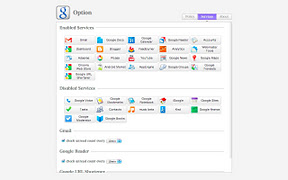
Quick access to Google!

This extension has 3 features.

1. shortcut icons to the services by Google
2. notify unread count on Gmail, Google Reader, and Google+
3. share current page via Gmail or Blogger with context menu

Supported services:
Gmail, Google Calendar, Google Reader, Google Contacts, Google Tasks, Google Docs, Google Sites, Google Analytics, Webmaster Tools, FeedBurner, Blogger, Google Adsense, Google AppEngine, Picasa, YouTube, Dashboard, Accounts, Google News, Google Maps, Android Market, Google Groups, iGoogle, Google Notebook, Google Translate, Google Voice, Google Bookmarks, Google URL Shortener, music beta, Knol, Google finance, Google Moderator, Google Books, Chrome Web Store, Google+, Panoramio

FAQ
Q. Why is "Your data on all websites" needed?
A. "Your data on all websites" is needed to get link text when sharing link with context menu.

Q. Why is "Your browsing history" needed?
A. "Your browsing history" means just "This extension observes tab events and/or is able to use some functions about tabs (like creating, updating, and deleting)".
that is needed to open or select tabs.

Download