300x250 AD TOP

Showing posts with label Android. Show all posts

Saturday, 17 March 2012

Tagged under:

Touch My Life - Must have Android App.


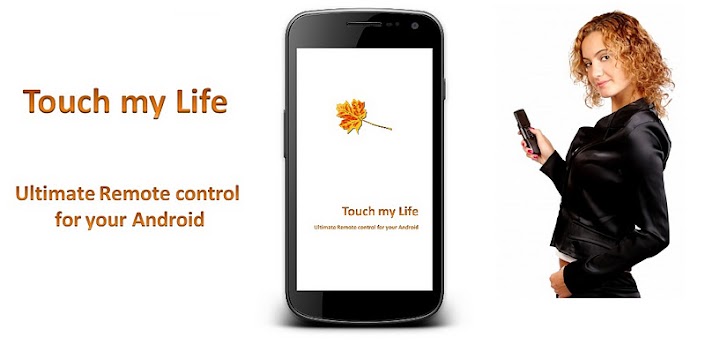
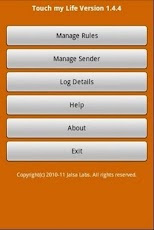
Touch my Life
Ultimate Android Remote Control
★★★★★ 5 Star Rated application
※ Featured in CNN-IBN as TOP Spy Mobile Application
※ Featured in Android Apps Review website: Click here to know more http://www.androidappsreview.com/2011/12/08/touch-my-life-android-app-review
Thanks for making "Touch my Life" as top 100 Best application. Click here to know http://www.100bestandroidapps.com/submitted-by-developers/284-touch-my-life
※ 5 Star Rated by apps400.com Click here to know more http://apps400.com/android-apps/touch-my-life-android-app-to-use-when-you-far-away.html
Did you ever wish that there was a remote-control for your phone?? Did you ever wish that it was possible to use your Android phone to take a picture from a remote location, record a video, Make call and listen in to conversations, send text messages (SMS), get details about your missed calls, fetch your exact Geo location!
If yes, this application is just right for you. Does not matter if you are a young Techno-freak, a business man, a housewife, a grand-mom or just a fun-loving person who likes to pull pranks on friends. This application is suitable for users of all ages and backgrounds.
"Touch my Life" is an revolutionary next generation application for Android phones which allows you to simply control your Android phone remotely via text messages (SMS)
After you install this application in your Android mobile and send an SMS from any ordinary mobile with specific set of Keywords in the SMS, "Touch my Life" will execute the associated Action.
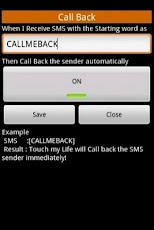
For example, SMS ‘CALLMEBACK’ from any ordinary phone to a phone where Touch my Life is installed.."Touch my Life" will call back the sender automatically.
SMS 'SENDPHOTO' srinath@email.com. Touch my life send the live image to the email specified.
More details of the app with detailed user manual are available on our website : www.touchmylife.weebly.com
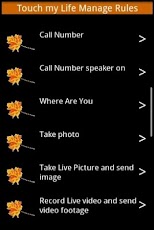
SMS Keyword and its respective actions are given below.
CALLMEBACK:Touch my Life (TML) application will call back the sender
CALLBACKSPEAKER:Call back the sender with speaker phone on
SENDPHOTO john@gmail.com :TML application will take a Live Picture and send it as an attachment to the email specified
SENDLIVEVIDEO john@gmail.com:TML application will record a live video for 20 seconds and send as an attachment to the email specified
VIBRATEE:Vibrate the phone for 10 seconds
CALLNUMBERSPEAKER +14081234567 :TML will call the number specified in the SMS Body with speaker on
WHEREAREYOU:TML will send the GPS Location, Address with the Google map links to the sender
SENDALLSMS john@gmail.com: Retrieve all the SMS Text(Inbox/Sent) from the and sent to the sender email
RECORDAUDIO:Record Live Audio for 30 seconds and save the filein SD Card.
SENDAUDIORECORD john@gmail.com : Record the Live audio for 30 seconds and send the audio file as attachment to the email specified
SETGPS 1/0: Set GPS Ona/OFF
SETWIFI 1/0: Set Wifi On/Off
SENDMOBILEINFO:Send Mobile info viz. Ring mode,Battery remaining,Miss call count, etc
SENDCALLLOG john@gmail.com:Send the call log details viz Incoming Calls,Outgoing Calls,Missed Calls
BUZZMYMOBILE:Buzz my mobile with Full volume. Use it when you misplace the mobile
SENDCONTACTLIST john@gmail.com:TML will send the entire contact list to the email specified. TML will also send confirmation SMS
TMLHELP:TML will send the Active Keywords to sender with syntax
and plenty of more keywords ...
We are happy to take any comments/suggestions. If you have any please log the same in : http://touchmylife.weebly.com/discussion-forum.html
Touch my Life team will be happy to assist you.
Tags: "remote", "SMS Spy","Phone Spy", send location,Phone Location,SMS Location,remote photo,remote video, where are you,touch my life,"touch my life", tml, remote ,remote control, sms remote, SMS server, server, prank, funny, handicap, sexy, spy , cctv , "Spy software", secrete, SMS receiver, SMS sender, automatic, auto reply, calendar event, audio record, take picture


                  Download

Tagged under:

Opera Mini Next - The Fastest Browser for Android Mobile and Tablets

Opera Next gives you a sneak preview of what's to come in future versions of Opera. Advanced users have the chance to test out exciting new features that are still under development for the next release of Opera Mini – and provide feedback on how to make it even better.
Opera Mini Next is not intended for everyday browsing. If you're looking for the current final release of Opera Mini, click here: http://bit.ly/opera-mini-android .
Once you download Opera Mini Next, you will see a white “O” icon instead of the normal red Opera “O”. Since it is a separate version, no changes will be made to your original Opera Mini installation. Read more about Opera Mini Next here: http://opera.com/mobile/next/.
We want to know what you think! To report a bug or make suggestions, please use our Bug Report Wizard (http://mini.bugs.opera.com/) or the user forums (http://my.opera.com/community/forums/forum.dml?id=111 ).
Discover more at http://opera.com/mobile/next/
Find developer-specific resources at http://dev.opera.com/
Keep in touch with Opera:

Permissions
THIS APPLICATION HAS ACCESS TO THE FOLLOWING:
NETWORK COMMUNICATION
FULL INTERNET ACCESS
Allows an application to create network sockets.
CONTROL NEAR FIELD COMMUNICATION
Allows an application to communicate with Near Field Communication (NFC) tags, cards, and readers.
YOUR PERSONAL INFORMATION
READ BROWSER'S HISTORY AND BOOKMARKS
Allows the application to read all the URLs that the Browser has visited, and all of the Browser's bookmarks.
STORAGE
MODIFY/DELETE USB STORAGE CONTENTS MODIFY/DELETE SD CARD CONTENTS
Allows an application to write to the USB storage. Allows an application to write to the SD card.

Tuesday, 6 March 2012

Tagged under:

7 Office Suite for Android Devices

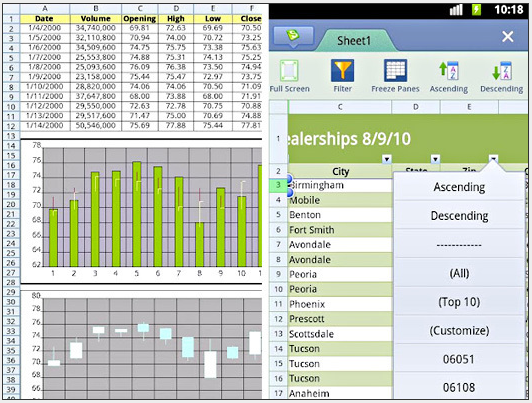
You can take your work with you, thanks to several office suites which let you view and edit your documents on an Android device. Most were originally designed for use on a smartphone, but here are seven that are compatible with most Android tablets that run Android 2.3 (codenamed “Gingerbread”). We’re listing these apps in reverse order, from the least to the most useful.

7. Google Docs (Free)
Main features: View and edit text, spreadsheets, slideshows and PDFs stored on your Google Docs account. You can also create text and spreadsheets from scratch, but not slideshow presentations.
Notable extras: You can view images that you’ve uploaded to your Google Docs account.
Conclusion: You cannot upload office documents to your Google Docs account through this app, although you can upload images. Apparently, it’s meant to mainly serve as a companion tool to the Google Docs site -- i.e. you upload your documents to the site first, and then use this app to view them, do simple file management, and very basic editing.


6. Documents To Go ($14.99)
Main features: View, edit and create text, spreadsheets, and slideshow presentations. View PDF files.
Cloud storage: Can load documents directly from your Google Docs account for viewing and editing.
Notable extras: A free app provided by the developer, DataViz, lets you sync your documents created with Documents To Go between your Android device and a Windows computer.
Microsoft Office compatibility: Could not load images contained in .docx files. Could not display charts or images in either .xls or .xlsx files. Some .ppt files would not load.
Conclusion: Very minimal feature-set in presentation app. Expensive for what it doesn’t provide.


5. Kingsoft Office (Free)
Main features: View, edit and create text and spreadsheet documents. You can view and edit slide-show presentations, but oddly, you cannot create one from scratch. View PDF files.
Cloud storage: Can load documents directly from your Box.net account for viewing and editing.
Microsoft Office compatibility: Loaded various .doc, .docx, .ppt and .pptx files we threw at it, but had trouble with Excel formats (.xls and .xlsx).
Conclusion: It’s disappointing that this suite can’t access your Google Docs files. Also, the spreadsheet app is really limited. But for a tablet, this suite has a cut-and-paste UI that works well, and is a decent reader app to view your Word and PowerPoint files.


4. OfficeSuite Pro ($9.99)
Main features: View, edit and create text and spreadsheet documents, and slide-show presentations. View PDF files.
Cloud storage: Can load documents directly from your Google Docs account for viewing and editing.
Notable extras: The word processing app has several features you’d expect to find in a typical word processor. The spreadsheet app includes a useful and convenient tool for creating charts.
Microsoft Office compatibility: Had difficulty displaying charts and images embedded in some .xls files.
Conclusion: Although its low price is great, OfficeSuite Pro’s difficulty with loading a few Excel files with embedded images, and its presentation maker (which has minimal content-creating capabilities), make it fall just a bit short.


3. Quickoffice Pro (14.99)
Main features: View, edit and create text and spreadsheet documents, and slide-show presentations. View PDF files. Designed specifically for tablet use.
Cloud storage: Can load your documents stored on Box.net, Dropbox, Google Docs, Huddle, MobileMe or SugarSync.
Notable extras: Lets you take a photo with your Android device’s camera and stick it into a document or presentation slide you are editing. Has a unified looking toolbar in its word processing, spreadsheet and presentation apps for conveniently accessing formatting functions.
Microsoft Office compatibility: Successfully loaded all Office documents we tested on it (in .doc, .docx, .ppt, .pptx, .xls and .xlsx formats).
Conclusion: Good features, but pricey compared to the next choices in this article that have better or more features.


Smart Office+ ($9.36)
Main features: View, edit and create text and spreadsheet documents, and slide-show presentations. View PDF files.
Cloud storage: Can load your documents stored on Dropbox and Google Docs.
Notable extras: Eye-candy UI shows thumbnails of the pages of your text document, or sheets of your spreadsheet, in a carousel-style display. Swiping through pages or sheets is smooth and fast.
Microsoft Office compatibility: Successfully loaded all Office documents we tested on it.
Conclusion: The word processing app lacks many formatting functions, but the hand-icon dragging UI is unique among them as a way move objects in your documents. We liked it for moving text (as well as images) when using a tablet.


ThinkFree Office Mobile ($9.99)
Main features: View, edit and create text and spreadsheet documents, and slide-show presentations. View PDF files. Designed for use on Android tablets.
Cloud storage: Can access files in your Google Docs account. Additionally, the company behind it, Hancom, gives you 2GB of storage for free on their own servers.
Notable extras: Drawing tool lets you sketch freehand. Lets you snap a photo with your device’s camera.
Microsoft Office compatibility: Successfully loaded all Office documents.
Conclusion: Because of its wide set of options for creating images from scratch, this office suite is great for building slide-show presentations. Good compatibility with Microsoft Office documents and a cheap price also help to make ThinkFree Office Mobile the best overall value for Android tablet owners.
Thanks:NetworkWorld.com

Sunday, 4 March 2012

Tagged under: ,

HOW TO: Use Android Mobile as a Webcam

Few days ago i wrote about “How to install android on a PC“. Now i am here with an interesting title to use your android mobile as a webcam. All you need is an android mobile and an IP Webcam android app. You can download this app from android market and it is available for free. It helps you most when you are out and searching for a webcam to make a video call with your friend.
android app ip webcam
The first step you need to do is, download and install IP Webcam from android market. The installation is not a big deal though, the app is available for free. After installation you can find the IP Webcam icon in the home menu like any other android app you install. It works with Wi-Fi and cellular data of your mobile. You can customize resolution of your video, image quality and more.
android app ip webcam 2
After personalization, you need to start the server which generates you an unique ip address. You can view the video using that ip address in your mobile browser or PC. There are multiple options available in viewing your video from a web browser. You can view directly in browser or you can view from VLC or Windows Media Player. Also you can capture the particular frame in your video.
Note: Only you can directly view the videos in Java enabled browsers (firefox, chrome, etc).
android app ip webcam 3If you want to use that video for skype or any other video calls from your PC you need a driver which is available at the developer’s site. It will stream the video from your mobile phone to video calls. The software works only on the windows platform. If you using your mobile browser and need to use that video for your skype call or any video chat you can stream straight away by using that ip address
android app ip webcam 4
The above screen shot from developer’s site would explain you the process involved in streaming the video from your mobile to video calls. The driver will not work with the latest version of skype. So skype users can use some alternate drivers like MJPG (or) ManyCam.
Hope my article will help you sometime when you don’t have a cam ready in hand :) . Thanks for reading, feel free to post your doubts and suggestions.

Saturday, 3 March 2012

Tagged under: ,

Ubuntu For Android OS to Get a Mobile Computer Anywhere

Ubuntu for Android OS powered smartphone are about to arrive and that will let Ubuntu users to enjoy their Ubuntu Desktop anywhere anytime. All it requires is a Multi Core smartphone with android operating system and ubuntu app for android. You are all set to use your ubuntu os right from your smartphone. It is a full featured operating system for desktop computing and all you have to do is, connect your mobile to your computer monitor using HDMI to use it.
You must Dock your handset to use the Ubuntu OS and when it is removed from the Dock, you will be using the Android OS on your Mobile.
ubuntu android app
Android smartphones with Dual Core processor, GPU and GB of RAMs can now become a powerful desktop with this amazing development by Ubuntu Team. [Ubuntu Running on Android Video]
Why carry two devices, when you could carry only one? Your next high-end smartphone has far more horsepower than you’ll need on a phone, and more than enough for a laptop.

Ubuntu App for Android

The worlds favorite open source Linux operating system Ubuntu now join hands with High End Android phones to transform the way you work with your computer. All you need is a just a phone and no need to carry a laptop at all. This can also make your Android is an all in one device, where your android smartphone can serve you as the best mobile and Ubuntu adds Desktop feature once its connected to the computer. Amazing isnt it ? There is no date released so far about the beta release of Ubuntu Android App.
But it is very near and we can expect an official announcement from Ubuntu Team and this getting featured on Android Market as well. Ubuntu is open now for Handset owners to receive requests and suggestions to make the release to be a great one. If you are an handset manufacturer and like to join with the bandwagon then do visit the official page. Ubuntu for Android OS is one of the greatest move that will boost the sales of smartphones with Dual Core processors in coming days.
All we need to know is, the date when we can expect the beta release of this app. Thanks for reading and you may share this post now to tell the world about Ubuntu App for Android.
Tagged under: , ,

Ubuntu Running on Android Mobile Phone

Ubuntu Running on Android Smartphone development has started recently, and here is the first video preview of it by TheProgrammingWorld. The beauty of this great addition to be made will let you access your Pictures, Videos, Music and Apps on your Android phone in big display screen. Ubuntu Running on Android mobile phone unofficial video released by some open source linux enthusiast today and the overall feature enhancement that can be seen on the stable and official release by Ubuntu team looks very promising.

Android Apps on Ubuntu Desktop

  1. You can access your Phone Contacts.
  2. You can Read and Respond to your SMS Messages.
  3. You can access your Pictures taken using Camera.
  4. You can access your Installed Android Apps.
All these can be done by just connecting your Android mobile phone using a dock with your TV or Monitor Display. There is no doubt, that this addition will boost the sales of Android High-End smartphones. There will be a strong reason hereafter for people to buy android mobile phone with Dual Core processors. Ubuntu is one of my favorite operating system because of its stability and security. Android and Ubuntu joined hands to bring big difference in the way we carry and work with computers in coming days.

Ubuntu Running on Android

Here are some screenshots showing how your smartphone apps and files can be accessed on big screens very soon.
ubuntu android contacts
Android mobile phone contacts on Ubuntu connected to TV monitor.
ubuntu android apps
Accessing Android Apps on Ubuntu running on TV Screen.
ubuntu android video
Videos recorded using android mobile camera. You can play them using Ubuntu video player.
ubuntu android photos
Accessing photos taken on android phone.
ubuntu android sms
Get SMS Notification on big screen.
ubuntu android sms
Also you can Read and Reply to your Text Messages that your receive on your mobile phone.
All we have to wait for is an official Ubuntu for android app release date to start using these great set of features. You may share this post right away to let your friends also know about this. Thanks for reading and the comment box is yours.

Friday, 2 March 2012

Tagged under:

Android 5.0 Jelly Bean Arrives this Year End

Android 5.0 Jelly Bean to be released this year end that has huge expectations among Android fans. Google has recently released Android 4.0 Ice Cream Sandwich, considered to be an important upgrade for high end android handsets and many have got that too. With an improved UI, Navigation and features android 4.0 is a successful one. There are 850,000 android device activations happening every day and that brings 250 percent increase compare the previous year.
android jelly bean
Android users were expecting some battery fix during the launch of Ice Cream Sandwich but that was kind of big disappointment, and we can expect some great announcement atleast this time. Android is one perfect mobile operating system which only lags in terms of battery issues. When we use more third party apps, then it gets increased than what was default.

Android 5.0 Jelly Bean

Android Jelly Bean Developer version alpha and beta download files can be expected very soon, and then we can experience the major changes and upgrades made to the OS to make it even better mobile os. There are ofcourse rumors spreading around saying, like the android 5.0 jelly bean will arrive specially with more optimization to suite android tablets. Also it will get a super speed booting compare to any other mobile and tablet operating system.

Wednesday, 29 February 2012

Tagged under:

Gingerbread Keyboard APK Now Available For Eclair And Froyo Users - No Root Needed

As exciting as seeing the Gingerbread keyboard leak out was, the fact remained that users stuck on Android 2.1 or below couldn't join in on the fun, and the same went for users of non-rooted devices.
Fortunately, the Android community rests not, and the keyboard has been neatly packaged into an APK and posted for all to see. Thanks to XDA-Developers member hotaru, both Éclair-running and non-rooted handsets can now access Google's latest input method.
To install:
  1. Download the file appropriate to your OS (download the file from here if you're on Froyo; if you're running Éclair, grab it from here).
  2. On your computer, move it to the root (or the main folder) of your phone's SD card.
  3. Unplug your phone from your computer, enter your favorite file manager, and install the APK.Alternatively, you can download the file directly to your phone and install it as you would any other APK - simply select it from the notification bar when it's done downloading and hit "Install."
  4. Open the "Settings" application, go to "Language and Keyboard," and enable the "Gingerbread Keyboard."
  5. Go to any text field, long press it, select "Input Method," and select "Gingerbread Keyboard."
The obvious advantage here is the availability of an Éclair version, but there's actually another bonus: you can install this keyboard alongside the regular Android keyboard that has been with us since 1.6, an option that was not available in the previous version. As they say, it's the best of both worlds!
Tagged under:

ShareKeyboard Lets You Type On Your Android Phone Using Your Computer's Keyboard

SwiftKey Keyboard, which was already one of Android's best third-party keyboards, recently shed beta status, and BlindType is starting to look interesting now that Google's bought the company, but the fact remains that for diehard typists, nothing beats a full computer keyboard.
image image
DoMobile, the developers of ShareKeyboard, must share that mentality, for the app they've produced allows users to pair the keyboard they usually type with when using their computers with their phones. The process isn't entirely seamless, as the app connects to your keyboard via WiFi rather than via Bluetooth, meaning that rather than pairing the keyboard directly with the phone, you must type your IP address into your browser's address bar. This has both ups and downs - not everyone has Bluetooth built into their computers, but then again, not everyone is always using a network connection (train, etc).
From the browser, you type text in a text box and have it show up on your phone (see screenshots above). In my practice, it's worked flawlessly, even if the text was a tad late in showing up. Of course, just how useful ShareKeyboard ends up being for you depends on what you're trying to do - chances are that if you're near a conventional keyboard attached to a computer, you will not need to hook it up to your phone for typing.
Got a scenario where you think ShareKeyboard would be useful? Drop a line in the comments and let us know.

Download

Download the free, ad-supported version of ShareKeyboard by scanning or clicking the QR code below:
QR code for https://market.android.com/details?id=com.domobile.sharekeyboard
or download the paid version for £2.99:
QR code for https://market.android.com/details?id=com.domobile.sharekeyboardpaid
Source: Addictive Tips via Lifehacker
Tagged under:

[New App] Clip Ninja Saves Almost Everything You Type, Like A Clipboard On Steroids

How many times have you typed something long, be it a URL or text message, only to accidentally erase the entire thing and have to start over? That has happened to me more times than I care to count, but thanks to a new app called Clip Ninja, that scenario could be a thing of the past.
The idea behind Clip Ninja is pretty simple: it keeps track of most things that you type. Of course, there are limitations (and in this case, that's a good thing) - it can't keep track of passwords. What it can do, though, is store all of the text that you input into any native app, which covers basically everything that you use on a daily basis.
1 2 3
Before we continue, let's address address the privacy concerns that you're surely having at this point. This app requires no special permissions. None. At all. Basically, all it does it store your data locally, so it doesn't need any permissions to do so.
It will work with any keyboard, in [almost] any app. Clip Ninja eliminates the need to type anything twice ever again. If you ask me, that's just convenient.
4 5
The app is $1.49 in the Android Market, hit the widget to grab it!
Clip Ninja
Download Clip Ninja from the Android Market
QR code for https://market.android.com/details?id=com.qoobees.clipninja
by Qoobees
100 downloads, 46 ratings (4.7 avg)
Tagged under:

A.I.type Keyboard Gets 'Plus' Version, Brings UI Improvements, Enhanced Autocorrect, And Phrase Shortcuts

Fans of the popular A.I.type Keyboard who have been running the beta version since its release will likely want to head over the Android Market and grab the newest incarnation of the software in its Plus variant. This is essentially the final build of the current beta run, adding a ton of new features to an already solid keyboard offering.
ss-480-1-2 ss-480-2-1 ss-480-3-1
With A.I.type Keyboard Plus, you never have to worry about spelling mudsrjrs again.
With this new version, you can expect an improved UI which allows you to toggle the appearance of the bottom row buttons, an improved autocorrect engine, and phrase shortcuts that allow you to easily replace simple abbreviations with commonly used phrases. For example, I can set "ap" to automatically insert the"Android Police."
Other features include:
  1. Auto texts – auto expansion of your text shortcuts
  2. Portuguese layouts added
  3. Full flexibility in customizing bottom row buttons (gaining larger space bar).
  4. Enter key always appears (for example, when messaging).
  5. Theme gallery!
  6. Settings for customizing suggestion colors
  7. Setting for dot on double space
  8. Swipe down to hide keyboard. Swipe left to delete last word.
  9. Auto-correction of single character words fixed.
  10. Improved auto correction and prediction
A.I.type Keyboard Plus is available in the Android Market now for $4.82. Bam.
A.I.type Keyboard Plus
Download A.I.type Keyboard Plus from the Android Market
QR code for https://market.android.com/details?id=com.aitype.android.p
Tagged under:

[New App] Lock Your Important Or Personal Apps Down Tight With 'Ultimate App Guard'

We all have apps that we would prefer to keep prying eyes away from - SMS, Email, Facebook, banking applications... the list goes on and on. You can always lock your entire phone down with a pin, password, or pattern lockscreen, but it gets tedious and annoying to have to unlock each time you want to quickly check something.
ss-480-0-0 ss-480-1-0
Enter Ultimate App Guard, a new app that lets you lock down specific applications. The app features seven different unlocking methods, including PIN, password, pattern, force close, dialer, error message, and image screen. You can customize the interface, including the lockscreens, schedule specific apps to only be locked at specific times of the day or week, and organize lock-able apps into profiles. There is also a widget that allows you to quickly enable or disable app-locking.
There is a free version that offers basic locking options, and the full version of the app will set you back $1.34. If you're looking for some added privacy on your phone, hit the links below to download.
Ultimate App Guard
Download Ultimate App Guard from the Android Market
QR code for https://market.android.com/details?id=com.anttek.appguard
Ultimate App Guard Pro
Download Ultimate App Guard Pro from the Android Market
QR code for https://market.android.com/details?id=com.anttek.appguard