
The runonce page
is a page which appears when you run the IE for the first time or if you
Reset the Setting using Internet Options Advance Tab. Runounce page
allows you to customize some of the setting you preferred.
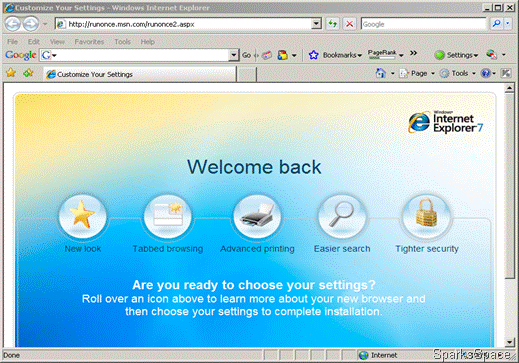
The problem with this page is, some time this page does not load and ended with an Error on Page. So every time you open IE7, this page loads and nothing will happen. How to disable this annoying prob?
You can disable the "RunOnce" of IE 7 either by a simple registry trick or by an application IE 7 RunOnce Remover
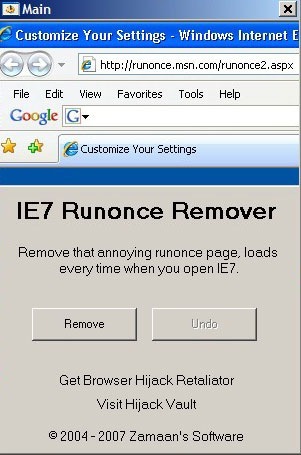
Download this utility and double-click it. Click the Remove button. As a bonus, you can undo the change anytime you want.
Here is how to edit the registry to remove this one:-
1. Click Start, click Run, type regedit, and then click OK.
2. Locate the following registry Main, the path is HKEY_CURRENT_USER\Software\Microsoft\Internet Explorer\Main
3. In the details pane on the right, double-click the RunOnceHasShown registry entry. Enter 1 in the value data box. Click OK.
4. In the details pane, double-click the RunOnceComplete registry entry, enter 1 in the value data box. Click OK.
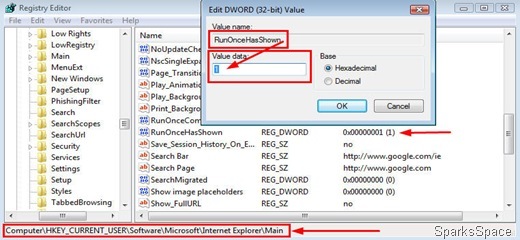
Remember both values for RunOnceHasShown and RunOnceComplete must be set to 1 otherwise the runonce page will start loading again whenever you launch Internet Explorer

The problem with this page is, some time this page does not load and ended with an Error on Page. So every time you open IE7, this page loads and nothing will happen. How to disable this annoying prob?
You can disable the "RunOnce" of IE 7 either by a simple registry trick or by an application IE 7 RunOnce Remover

Download this utility and double-click it. Click the Remove button. As a bonus, you can undo the change anytime you want.
Here is how to edit the registry to remove this one:-
1. Click Start, click Run, type regedit, and then click OK.
2. Locate the following registry Main, the path is HKEY_CURRENT_USER\Software\Microsoft\Internet Explorer\Main
3. In the details pane on the right, double-click the RunOnceHasShown registry entry. Enter 1 in the value data box. Click OK.
4. In the details pane, double-click the RunOnceComplete registry entry, enter 1 in the value data box. Click OK.

Remember both values for RunOnceHasShown and RunOnceComplete must be set to 1 otherwise the runonce page will start loading again whenever you launch Internet Explorer

