300x250 AD TOP

Showing posts with label Utilities. Show all posts

Sunday, 4 March 2012

Tagged under: , ,

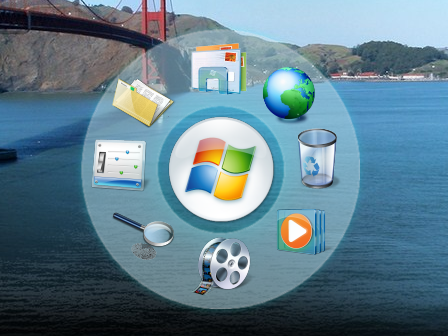
Circle Dock - Drag and drop your files folders and shortcuts onto a circular


Like most application launches, Circle Dock comes with a list of icons for frequently used programs, like the Control Panel, your default browser, and the recycling bin. You can add shortcuts by dragging them from your desktop or quick launch bar and customize to your heart's content.
Circle Dock has a ton of visual customization options as well. You can either display your icons in concentric circles, or as a spiral. You can add a rotating animation effect to the spiral to make yourself dizzy. There are a more than 30 skins to choose from.
This attractive freebie turns the usual ribbon-like dock inside out. Its default shape is a set of concentric circles, but it can also take the form of a spiral. You can further personalize the look with included skins and your own icons. The settings window offers useful tweaks as well, such as conditions for hiding the dock and a Portability Mode that lets you tote Circle Dock on a USB drive
What Circle Dock Allows You to Do:
  • Drag and drop your files, folders, and shortcuts onto a circular or spiral dock.
  • Rotate the dock with either your mouse wheel or the keyboard arrow keys.
  • Change the image shown for the icons and change the skins (compatible with icons and skins for Rocket Dock, Object Dock, etc.)
  • Ability to run the program from a portable USB memory stick and have the links in the dock point to the documents on the USB memory stick.
  • Ability to synchronize the links on the dock with the files, folders, and shortcuts on your desktop or other folders in real-time.
  • The dock appears where your mouse is by pressing a hotkey.
  • Works on computers with multiple monitorsimage
 

Download |7.81MB |Freeware
Sys Req:
  • Windows XP or Vista (32 or 64 bit)
  • .Net Framework 2.0 or higher. Vista users already have the .Net Framework - no need to install anything else. Most Windows XP users have the .Net Framework installed from Windows Update.
  • If you are unsure if you have the .Net Framework installed or are getting error messages, go to http://www.microsoft.com/net/Download.aspx and install the latest version of the .Net Framework
  • Tagged under: ,

    RemoveWGA 1.2


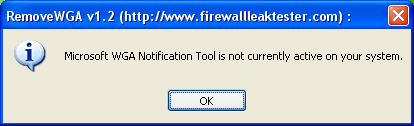
    imageA small utility that enables you to remove the Microsoft Windows Genuine Advantage Notifications tool.

    RemoveWGA will enable you to easily remove the Microsoft "Windows Genuine Advantage Notifications" tool, which is calling home and connect to MS servers every time you boot.
    image
    SysReq: Windows XP |14KB| Freeware
    Download icon |Mirror
    Tagged under: ,

    Tweak Vista Settings with Ultimate Windows Tweaker


    Ultimate Windows Tweaker is a Tweak UI Utility for tweaking and optimizing Windows Vista, 32-bit & 64-bit.The utility has a simple easy-to-use user interface, with the tweaks being classified in separate heads based of their functionality. Most tweaks are hidden inside Vista, and what this tweaker does is to try and put the useful one's in one place.
    Its only 368 KB EXE file which even doesn’t need any installation. You can directly run it after downloading so you can also carry it on your USB drive.You can also create a system-restore point just by clicking a button in the Ultimate Windows Tweaker window--handy just in case a tweak goes awry. Or click Restore Defaults to set everything back the way it was.

    The tweaks are classified under seven categories and can be accessed through a common interface, just like your Windows Vista Control Panel.
    1) Personalization,
    2) User Accounts & UAC,
    3) System & Performance,
    4) Security,
    5) Internet Explorer (IE7 / IE8)
    6) Network Optimization
    7) Additional Options
    Ultimate Windows Tweaker
    SysReq:Vista32/64 bit|I E 7 or higher|Freeware|368KB
    Tagged under: , ,

    Add Folder or Application In My Computer and Control Panel


    Folder2MyPc is a FREE utility which allows you to add any folders and programs in “My Computer” and “Control Panel”
    You can add,change,remove program shortcut to run any application or mount any folder on your hard drive under my computer, you can also choose how do you want to open the folder you have mounted in my computer in a new window or in the same window.

    Application Shortcut In My Computer and Control Panel


    Folder2MyPc

    Mount Folder Shortcut In My Computer

    Mount-Folder
    You can edit or remove the mounted folder from my computer any time clicking the Edit / Remove tab in Folder2MyPc
    You can also customize the folder icon which you want to mount in my computer or control panel.
    Download Folder2MyPC
    Tagged under:

    Shut down a computer at a specific date and time


    Download movies or other files from net will take some time to complete and we can’t really afford to just sit there and wait for the downloading to be finished.What we usually  do is we tend to leave the computer in power ON condition to download the file until we are back from outside or wake up in the early morning, then only turn it off once the downloading process has completed. In actual fact the downloading process may only take 1 or 2 hours but you may end up leaving it ON for whole night. Have you ever thought to have a tool that can help you auto shutdown your computer once the downloading process is completed?
    Mortens ShutDown is a very interesting free tool to shut down a computer at a specific date and time. It is simple to use: Setup a time when your computer shall shut down and run the application. There are several shut down modes supported as there are a simple user log-off, or restart or shutdown or power off the computer. Running applications that would prevent the computer from shutting down can be automatically killed. You can setup -Mortens ShutDown- to warn you before it really shuts down the computer.
    image
    In addition this tool can be used to control the launch of any application (from a remote computer) via an INI file. This allows e.g. the following:
    Setup a folder from where -Mortens Shutdown- will poll an INI file and react on changes made in it. If you setup this folder as a network share, you can easily modify any setting (e.g. application to launch) remotely.
    While -Mortens Shutdown- is running on the remote machine you can setup an application to launch within the INI file. Once you have set the "launch" flag in the INI file -Mortens Shutdown- will trigger the launch of the requested application (script) on the remote machine
    MortensShutdown | OS:  Windows All | Freeware| 1.08M
    Tagged under:

    Double Vision - Watch Online Video While You Work!


    Bored with  data entry job / some other  job  for few hours and looking for a way to make it more interesting ? Double Vision allows you to watch Hulu, YouTube, Netflix, Blockbuster and more directly within a Microsoft Excel window.
    When you load a video using the browser from one of these sites, the video will expand to the size of the browser so you aren't stuck looking at a video surrounded by text. With this you can watch online videos without impacting available space on your computer monitor and without interfering with programs already running.

    To use Double Vision, simply navigate to any website where you would normally watch an online video. Once you have started playing the video, click the "Go Double Vision" button and you will enter "Double Vision Mode". While in "Double Vision Mode", the browser window will be transparent and you can 'click-through' the browser and interact with programs that are running underneath them.A small Controls window will be displayed on the window which will let you change the transparency, move the window around your desktop and exit "Double Vision Mode".

    | Freeware | Windows Vista, Windows XP | 2.15 MB
    http://www.godoublevision.com/
    Tagged under: , , ,

    Optimize you PC with TweakNow PowerPack 2009


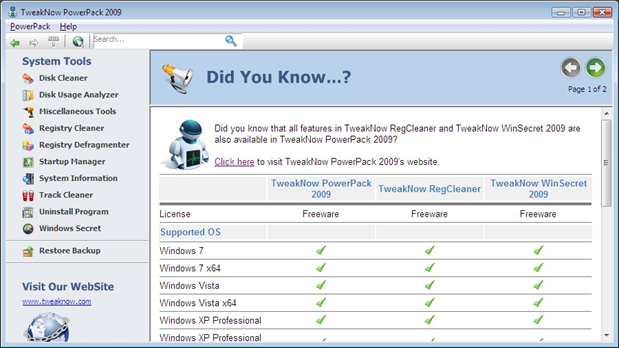
    TweakNow PowerPack is a fully-integrated suite of utilities that let you fine-tune every aspect of your computer's operating system and Web browser.It provides more than 100 hidden Windows settings in the Windows Secret section.To keep your computer always at  top performance, you have  to clean your registry  at least once a month.By using Registry Cleaner  module provides you with a safe and simple way to clean Windows Registry. It includes Disk Cleaner,Disk Usage Analyzer,Registry Cleaner & Defragmenter , Startup Manager,Track Cleaner,System Information and more.

    This suite also gives you a complete picture of all aspects of your computer's hardware, including detailed information about your motherboard, processor, video card, memory, hard disk and network.

    The Virtual Desktop module allow you run four custom-designed desktop configurations simultaneously.An AutoShutdown utility that lets you suspend, hibernate, or shut down your computer after a specified period of time.In addition to saving resources, this program keeps your system more secure by making it unavailable to unauthorized people.By using all of these modules , you can easily customize your Windows like geeks do.
    OS: Windows 7/Vista/XP| Freeware | 5.45MB |  Download  TweakNowPowerPack2009
    Tagged under: ,

    Optimize Your Windows 7 With Tweak-7

    Tweak-7 is everything you need to customize and tweak Windows 7 to fit your needs. From start menu, to desktop tweaks, from taskbar customization to system tweaks.It gives you access to whatever you might need to keep your Windows 7 running smoothly, error free, and under your full control which includes  system restrictions, system cleanup,  and system tweaking.

    Tweak-7 includes an internet connection analyzer, which automatically inspects your internet connection to speed it up by up to 25% - this incredible new feature is a must for every Windows 7 user used to browse the net at high speed!
    Features
    1. Activate hundreds of hidden Windows 7 settings to get the most out of your Windows 7
    2. Clean your registry with the integrated Registry Cleaner and Registry Defragmentation
    3. Activate system and software restrictions - you decide what should be accessible or not
    4. Display detailed 3D system information
    5. Create a 256 MB RAM drive for fastest access (32bit systems only!)
    6. Customize whatever is customizable in Windows 7
    7. Clean your hard drive and remove unnecessary files to get wasted hard drive space back - save hundreds of GB.
    8. Optimize memory management and memory usage
    9. Improve your internet connection by a few mouse clicks
    10. Optimize your CPU with special CPU tweaks
    11. Tweak your network with network speed-up settings
    12. Manage system updates, remove update backups, remove old system restore points
    13. Transfer your tweaks and settings to other machines running Windows 7 and Tweak

    Download:  Tweak-7 1.0 Build 1040 | Shareware | 22MB
    Tagged under: ,

    System Nucleus: All-In-One Maintenance Tool For Windows 7


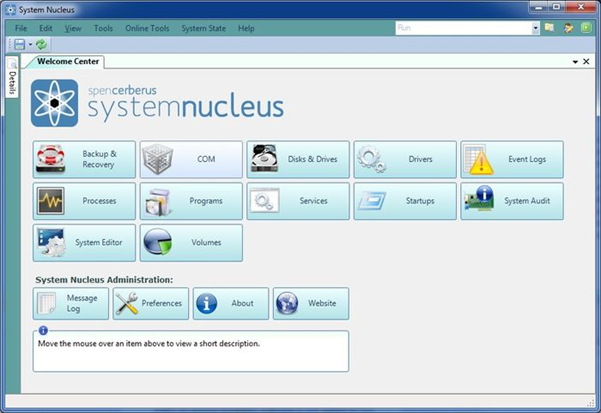
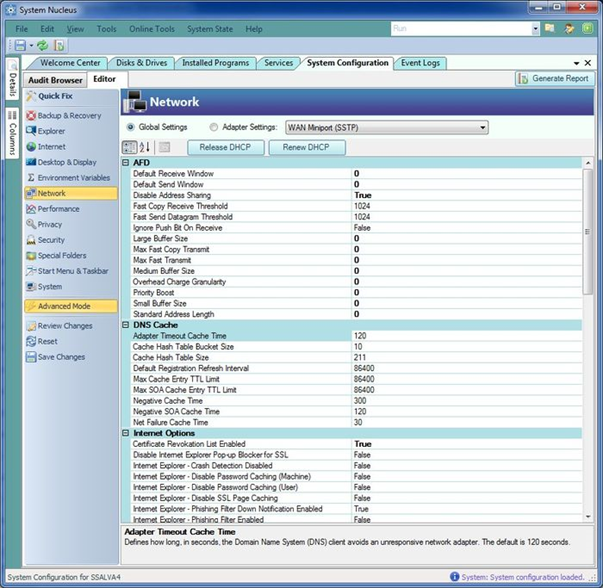
    imageSystem Nucleus is a free maintenance, tweaking and troubleshooting utility for Windows XP, Vista and Windows 7. The tool packs-in all the necessary tools that are essential to keep your system running smoothly.
    Important and essential tools such as backup & recovery, com editor, disk & drives, drivers, event logs, processes, programs, services, startups, system audit, system editor and volume manager can be found under welcome center.

    The best part about this tool is that it lets you quickly access popular online security tools to scan your file and system for virus, malware and other malicious items . The tool also lets you easily access hundreds of native Windows diagnostic, network, system and admin tools.


    Other than the standard installer, System Nucleus is also available as a portable tool (standalone installer) for both x86 and x64 versions of Windows. If you are looking for a good maintenance tool for your Windows, this is worth a try.

    Download System Nucleus
    Tagged under: , , ,

    Keep your Desktop In your Flash Drive


    image In using computers everyday you likely send email, check the news, track finances. In using different computers you probably have different programs on each machine, maybe even different operating systems. Have you wished each machine had the same applications? Or that the bookmark you just added to your browser were on the other machine? Have you worried about computer viruses or your child deleting the wrong files? LivePCs can help you in each case.

    A LivePC is a virtual computer. You can run a different operating system and different
    applications within it than the computer normally runs. You can run this virtual computer directly
    on a computer or from a portable drive on most computers. LivePCs can be found in The Lab on
    MokaFive.com or you can make, and even share, your own using MokaFive Creator.

    Variety


    LivePCs are run from our MokaFive Player on Windows XP, Windows Vista, Intel based Mac OS X
    machines, or BareMetal. You can run many different LivePCs from the Player. Have an
    application you'd like to use that only works under DOS? You can have a DOS LivePC and add
    that application. Would you like to run some applications under Linux? Download a Linux LivePC.
    Would you like to have a safe games play space for your child? Launch a child friendly LivePC

    Offline Use


    LivePCs can be set for use without access to the internet. You could compose an email at the top
    of Mount Everest on your LivePC to send once you are again connected to the web.

    Security


    LivePCs run on your computer but they are copies of the ones maintained on our servers. The
    LivePC operating system and applications are kept separate from your personal data. If your
    LivePC gets a virus, it will be removed when you exit and re-launch the LivePC. The operating
    system and applications on a LivePC are kept clean by matching them to the LivePC in The Lab
    on MokaFive.com. LivePCs are also independent. They are not able to open or affect files in
    other LivePCs.

    Portability


    You can put LivePCs and the Player on a memory card, USB flash drive, USB hard disk, or an
    iPod and take them to another machine. You will be able to take your LivePCs between Intel
    based Macs and Windows XP or Vista machines. When installed using BareMetal you can run
    from a machine which allows you to boot from USB.

    Backups (Windows portable installation only)


    Your portable LivePCs and your personal data can be backed up automatically to a Windows XP
    or Vista computer. Should you lose your portable drive you can create a new one from the
    backup.

    Personalization


    You can also create and share your own LivePCs, either by modifying existing LivePCs or creating your own from scratch. You can then register your LivePC at MokaFive.com to share
    with the world or just your friends, or you can keep it private. By posting and subscribing to your
    own LivePC you can be assured that any spyware you pickup in your LivePC virtual computer will
    be removed the next time you launch it.
    Demo: http://www.mokafive.com/mokafive-demo.php
    Download: http://www.mokafive.com/solutions/player.php
    Tagged under: ,

    HP USB Disk Storage Format Tool - v2.1.8


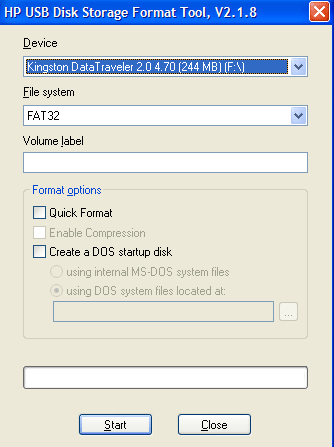
    HP USB Disk Storage Format Tool  will format any USB flash drive, with your choice of FAT, FAT32, or NTFS partition types.Additionally, the drive can be made bootable by using system files from Windows 98 startup-disks.
    By default on USB flash file system of FAT32, because of what files measuring more than 2 Gb writing down is not possible. By the program HP USB Disk Storage Format Tool it is possible to change the file system of your flash on NTFS.It has a graphical interface very similar to that of the Windows format tool.

    Features
    • Allows creation of a FAT32 volume larger than 32 GB.
    • Fixes installation issue where installation process stopped after the earlier version of software was uninstalled and the new software was not automatically installed. The installation process now restarts automatically to install the new software after uninstalling the older version
    HP USB Disk Storage Format Tool  Or http://www.mediafire.com/?trnhjngzwtz | 1.97MB | Freeware |OS:Windows 2K/XP
    Tagged under: , , , ,

    Keep any window Always on Top or Transparent


    There can be several different reasons why you may want to keep a window always on top of all other open windows. For example, having a video always show while working in another program, keeping a chat always visible, or keeping your most important web page on top at all times. Although some programs may have an always on top feature other programs such as Internet browsers do not support this feature. However, downloading the free PowerMenu utility will allow you to have any window always on top as well as specify the transparency of open windows.
    After PowerMenu has been downloaded and installed, right-click on the open window in the Taskbar or on the Windows Title bar to view a menu with options shown above. As can be seen in the above picture, the PowerMenu utility will add the Always On Top and Transparency options for each open window's menu.

    Download

    Saturday, 3 March 2012

    Tagged under: ,

    Password Protect Windows Programs With Empathy


    Many of us share our PC with other users ,but we may not to allow them to run all the programs which we use.Sometimes you want protected files stay protected when  you copy them to another location or even to another computer.  Here is a small, simple, easy-to-use but smart and reliable utility allowing you to password-protect any executable file called Empathy.It lets you protect any of your windows program like Firefox, Internet Explorer or any other program installed on your computer.

    Empathy allows you to protect potentially dangerous programs against running by an unauthorized person. You can use it to protect executable files in public places like schools, internet coffees or even homes.Empathy can modify an EXE file so that it will require a password to run. Only a person knowing the password will be allowed to run the protected program.

    Empathy lets you use a single character as password to protect executables .It is a postcardware as you will need to send a picture post card to the program author writing any thing to get the full version and then you can have password with more than one character(not an electronic/e-mail postcard - you can send something with a picture of your city on it, or anything you like). 
    Empathy is portable program which you can place any where on your hard disk or pen drive ,it does not require any installation.
    Empathy 2.1
    Sys Req:Windows NT3.51,NT 4, 2000, XP,Server 2003, Vista, 95, 98 ,Me|Freeware|180KB
    Tagged under: ,

    Free Password Protect Files Program For Windows


    One of the most important feature which almost every windows user wants in windows is to protect the private files with password. Many people keep some of the very sensitive files on their hard drive and other portable drives which they don’t want other to see.
    Androsa  is a free password file protector to protect your confidential documents or any other file with a secret password. It lets you lock any file in windows with a secret password.

    When ever you password protect any files with this program it will convert the file into an encrypted file which can be opened only with software and de-protected by entering the correct password. You can select among different encryptions method at the time of password protecting your files with this program.
    Let’s see how simple you can password protect any program with this software.
    This free password protect program get integrated with the context menu’s in windows so you can encrypt any file just by right clicking on that file.
    1. Right click on the file which you want to password protect, select Androsa FileProtector System.


    2. Now select the encryption algorithm you want to use and enter the password and click Protect.

    3. That’s it your file is password protect now. :)
    This free password protect program also lets you password protect files on your portable USB drive, you can download the portable version of this program from here
    Free password protect Androsa FileProtector is a free to use program which does not contain nay adware, spyware or malware etc.
    Download Androsa FileProtector
    Tagged under: , ,

    Prevent Unauthorized use of USB Ports

    If proper steps are not taken to secure your computing environment, a USB flash drive would be an ideal means of collecting valuable information and literally pocketing it. So what steps can be taken to secure your environment against these potentially sinister little devices?
    The freeware NetWrix USB Blocker enforces centralized access control to prevent unauthorized use of removable media that connects to computer USB ports, for example, memory sticks, removable hard disks, iPods, and more. USB port access control is a very  important aspect of your endpoint security, no matter how good your antivirus and firewall are. The USB device lockdown protects your network against malware and prevents theft of sensitive corporate data.
    Unlike other solutions, it requires no deployment of agents on client computers. Another advantage of the tool is simplicity, only a couple of mouse clicks to get the work done. And the most exciting: the software is completely free of charge.

    Benefits: 1) Prevents unauthorized use of removable devices.
    2) Hardens endpoint security.
    3) Enables regulatory compliance, such as SOX, GLBA and HIPAA.
    4) Freeware! Saves your IT buck for other important projects.
    Features:
    1) Seamlessly integrates with Active Directory.
    2) Requires no client deployment (no agents).
    3) Fully centralized management.
    4) Very simple to use, no monster tools and long learning curves
     NetWrix USB Blocker | Freeware | 795 KB
    Tagged under: ,

    PDF Owner Guard Personal Edition

    When you want to send a sensitive document via e-mail or make it available to many people, you have to consider what restrictions, if any, to apply to it so it can't be misused. PDF OwnerGuard is a reliable digital rights manager and data protection system.

    Features
    • The protection system lock your PDF documents to specific machines
    • Control and apply limitations for viewers using a unique DRM component called License Manager. This minimizes viewers' DRM hassles by letting them access your DRM protected files offline.
    • The encryption and protection method is based on an advanced 256-bit AES encryption system.
    • These protected files are just like normal files, and users do not need to run any additional application to access them or to have
    • You can place on your files include working time, expiry date, and print and save functions.
    • Users can lock the files to specific computers, and encrypt and protect new output files too.
    • Use of the clipboard, screen capture, dragging & dropping, and write  can be restricted and create permissions.
    • A license code can be generated by the user and copied to the clipboard by pressing a button, and you can share it with your intended recipients separately.

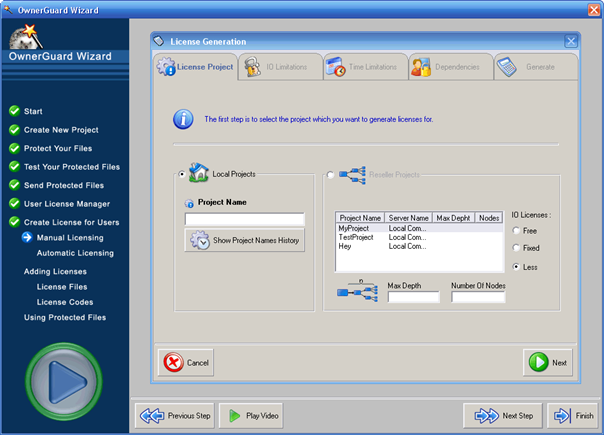
    When compared to the security and encryption features provided by Adobe’s DRM method, OwnerGuard gives more for the buck. Apart from access limitations, license expiration and machine dependency support, it also provides support for encrypting newly created files. Creating a protected file grouped by projects is easy with a wizard that guides you through all the steps.
    Once you have created a project, associate a license with it by placing limitations on any PDF files produced under that project, then add files, and finally click the ‘Protect Selected Files’ button. The License Manager lets you view, access and distribute your custom computer ID.
    SysReq:WINDOWS XP/2000/98|Freeware
    PDFOwnerguardPersonal
    Tagged under: ,

    A Free Security Software to Hide Folders

    Windows have a folder lock security feature, but this integrated function has a lot of shortcomings, it is hardly usable on network because sys admin can easily view the content of the locked folders, anyone who has an access/login on your computer can open locked folders, it doesn't support FAT32 and it doesn't work on Home edition of Windows. Furthermore, locking folders means that all users that has access to your computers can still see those folders.
    Hide Folders, on the other hand is not meant to lock the folders with predefined password, it is meant to simply HIDE them, so no one can even know of their existence. It is simply more efficient not letting anyone know that you even have some confidential folders. Secondly, you can password protect the application so no one can open Hide Folders to unhide your hidden folders. Remove the Hide Folders from the programs menu and 99% of people wouldn't even know that you have a folder hiding program installed on your system.So by  using this application hided folders can not be accessed, viewed, searched or deleted .

    Hide Folders Features
  • Securely hide folders with your confidential data
  • Works on Windows XP and Windows Vista, supports NTFS, FAT32 and FAT file system.
  • Password protection - folders can be unhid only after entering a password within the program.
  • Hidden folders can not be uncovered by deinstalling the program.
  • Unlimited number of folders can be hidden.
  • Folders are hidden even in Windows safe mode.
  • Fast and user-friendly skinned user interface.
  • Intuitive for usage, no learning curve.
  • Sys Req :Windows XP, Vista, 2003|Freeware |1.43MB
    HideFolders
  • Tagged under: , , ,

    Fix Windows Update In Windows With WUfacility


    WUfacility is a Windows Update used to repair small tools, it can solve many common problem of Windows Automatic Updates. The software cleans Windows temporary files, clean Windows Update temporary files  and registers the DLLs of the Windows Update.

    Features
  • Windows temporary folder clean-up
  • Stop Windows Automatic Update Service
  • Clean-up folder Windows Automatic Updates
  • Windows Automatic Updates the registration of the DLL files related to
  • Restart the Windows Automatic Updates service The software is easy to use and shows the steps that were executed successfully or not.
    SysReq: Windows7,Vista,XP |  Freeware | Microsoft. Net Framework 2.0 |12KB
     Wufacility or From Softpedia  | InsideCore